
Use RefWorks to store, organize, insert, and format citations for research papers.
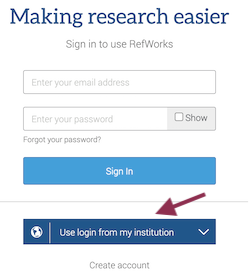
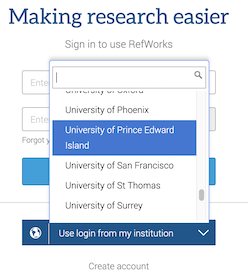
  New users: Use the "Create account" link below the form here! New October 2018: You can now "Use login from my institution" (type in UPEI and select it) to create or log into your account. To use your UPEI credentials with an existing account, see the Refworks instructions.
|
More information:
General Support
- Access to RefWorks after graduation - You can access your RefWorks account after graduation by completing a few changes to your account, as documented in that link
- Get Live "Chat" support right now if an "agent" is available - ignore the main support form and look at the bottom right to find the chat widget
- RefWorks - About, Guides and Webinars, FAQ, and Help
- RefWorks Guide
- RefWorks YouTube videos
How To
- How to Import References to RefWorks from OneSearch
- Microsoft Word, Google Docs and RefWorks - use the plugin, RefWorks Citation Manager, to add citations to Word or Google documents , and then format the citations and reference list/bibliography. Also explains "Save to RefWorks" citation import tool from your browser.
- Importing References from UPEI Databases - detailed instructions for individual databases
- RefShare - share your RefWorks folders
- Importing References from Other Citation Management Software (e.g., Endnote, Zotero, Mendeley, Reference Manager) to RefWorks (a RefWorks guide)
Technical Issues
- Mac Users: If you get JDK Java Error, install this.
- UPEI Office 365 users: if you are unable to install the RCM plugin for Word, read more at https://library.upei.ca/rcm-office365.
- Ad-Block users: If you can't upload files, try disabling your ad-blocking extension on Refworks pages.
- RefWorks slides from Robertson Library Workshop
Other Citation Management Software
- Other Citation Managers (Zotero & Mendeley)
- Citation Manager Comparison Charts
- Citation Management (University of Toronto Gerstein Science Information Centre)
- Comparisons of Programs (UC Berkeley Library - Sheldon Margen Public Health Library)
Please contact the Robertson Library Service Desk, in person, by telephone 566-0583, or the ASK US chat help if you have any questions about using RefWorks.
Not specified